
Flagship tools

The three tools that own month-end — and the year ahead.

A branded board-pack builder, a report layout you control account by account, and a 12-month forecast with scenarios — the features practices lean on hardest when they close the month and plan the next one.

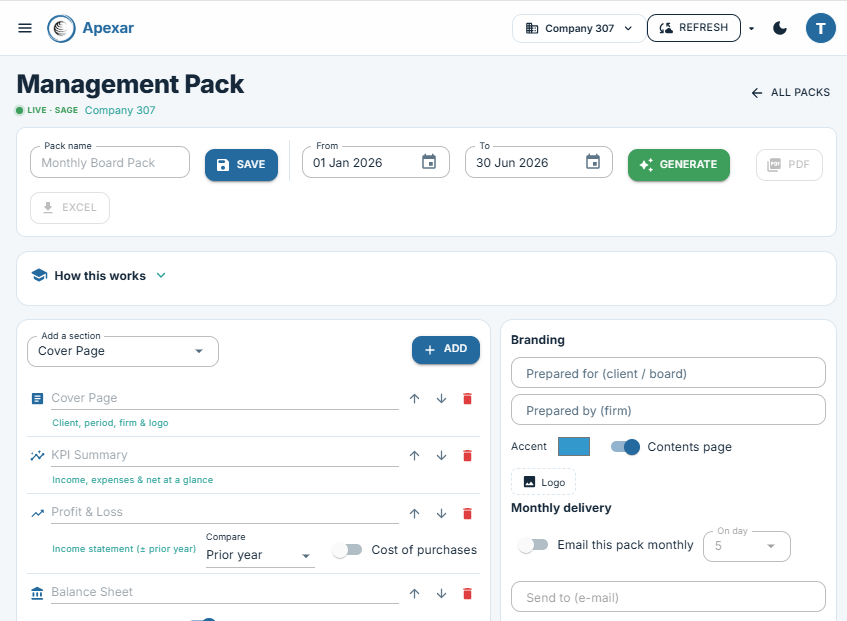
Apexar Management Pack builder — reorderable sections, branding and monthly delivery
Board & management reporting

Management Pack

Assemble a board pack section by section — cover page, KPI summary, P&L, balance sheet and more — reorder them, add your firm's logo and accent colour, then generate to PDF or Excel. The P&L section runs against budget, prior year or both, as a single period or month by month. Set the pack to email automatically each month, per client or per consolidated group.

  • Drag-and-order sections: cover, KPIs, P&L, balance sheet, cash flow and beyond
  • P&L vs budget, vs prior year, or both — with monthly columns and YTD if you want them
  • Your branding — "prepared for / prepared by", logo, accent colour, contents page
  • One click to a polished PDF or Excel pack
  • Schedule monthly delivery to any inbox, on a day you choose
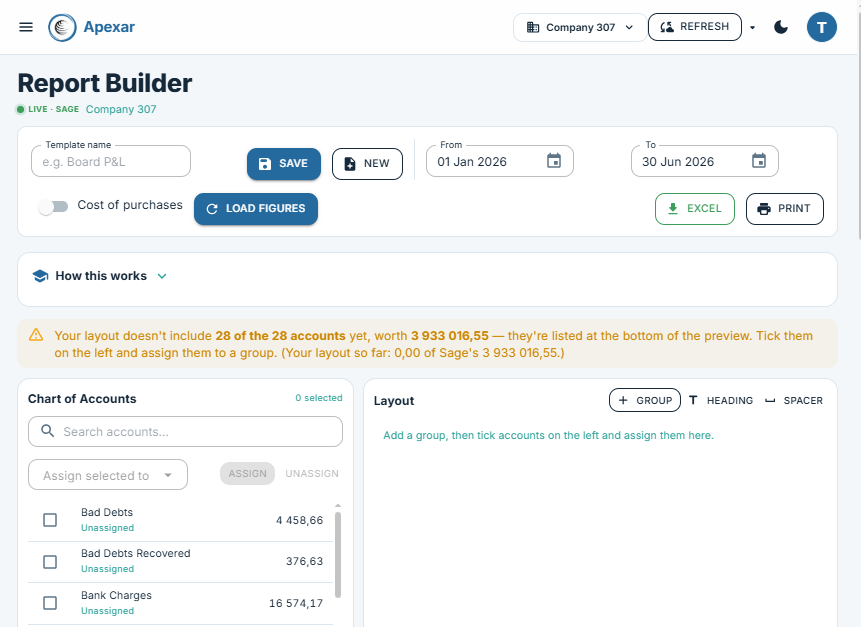
Apexar Report Builder — assign every Sage account into custom groups that reconcile to the cent
Custom financial statements

Report Builder

Compose a custom financial report straight from your Sage chart of accounts — create groups, headings and calculated rows such as Gross Profit and GP %, then assign every account exactly where you want it, or let Apexar group them by Sage category in one click. Run the layout for a period or month by month, against budget, prior year or both. Apexar flags any account you've left out, with its value, so the layout always reconciles back to Sage down to the cent.

  • Builds from the live Sage chart of accounts — one click groups everything by Sage category
  • Your structure — groups, headings, spacers and calculations (sum, A minus B, A as % of B)
  • Monthly columns with YTD; compare to budget, prior year, or both
  • Reconciles to Sage to the cent — Excel with a cover sheet, or print
  • Save reusable layouts for every client and drop them into a Management Pack
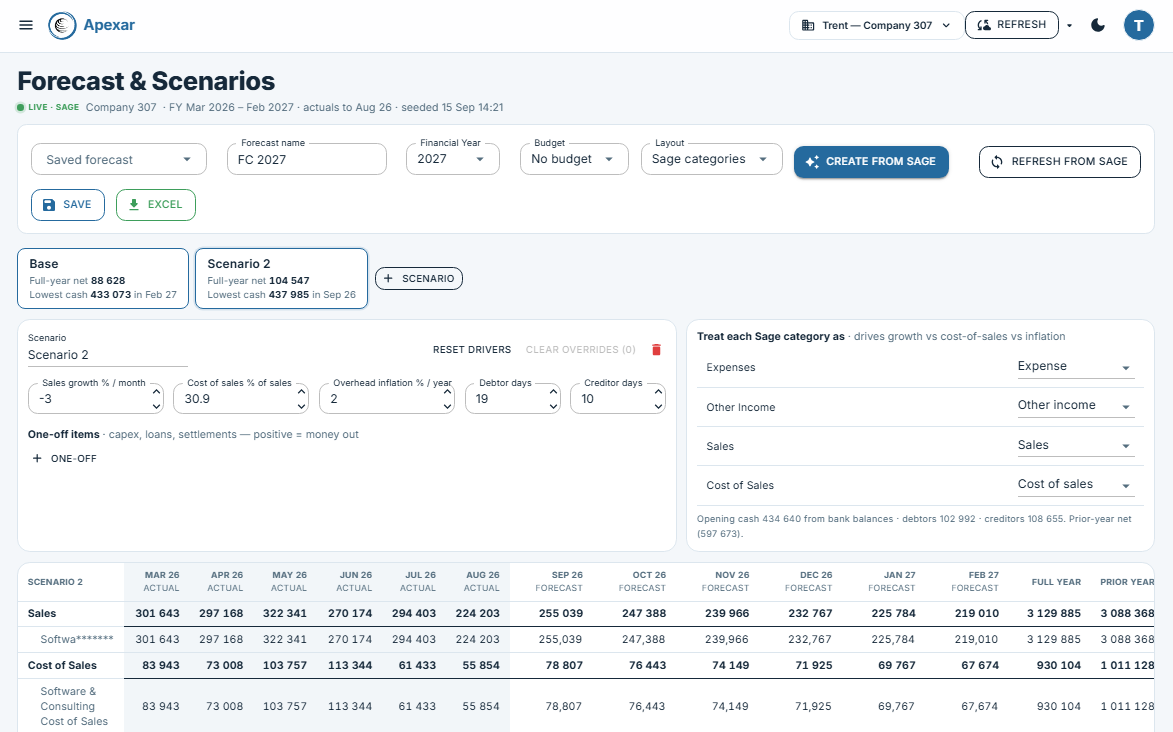
Apexar Forecast & Scenarios — Base and Downside scenarios side by side over a 12-month forecast grid
Forecasting & what-if

Forecast & Scenarios

A rolling 12-month forecast of the financial year, seeded from Sage in one click — closed months as actuals, the year's budget, your bank balance — then steered by five levers: sales growth, cost of sales, overhead inflation, debtor and creditor days. Overtype any cell you know better. Save Base, Upside and Downside and read the answer off the cards: full-year profit vs budget, and the month cash runs lowest.

  • Seeded from Sage — actuals to date, prior-year history, budget and bank balance
  • Drivers proposed from the data, then yours to change; every month recalculates instantly
  • Cell-level overrides, highlighted so nothing is hidden
  • Named scenarios side by side, with lowest-cash month and full-year vs budget for each
  • Presents in any saved Report Builder layout — Excel with a sheet per scenario

Financial intelligence 14 reports

Live · via Sage API

The numbers, pulled on demand from Sage's own report engine at the moment they're run.

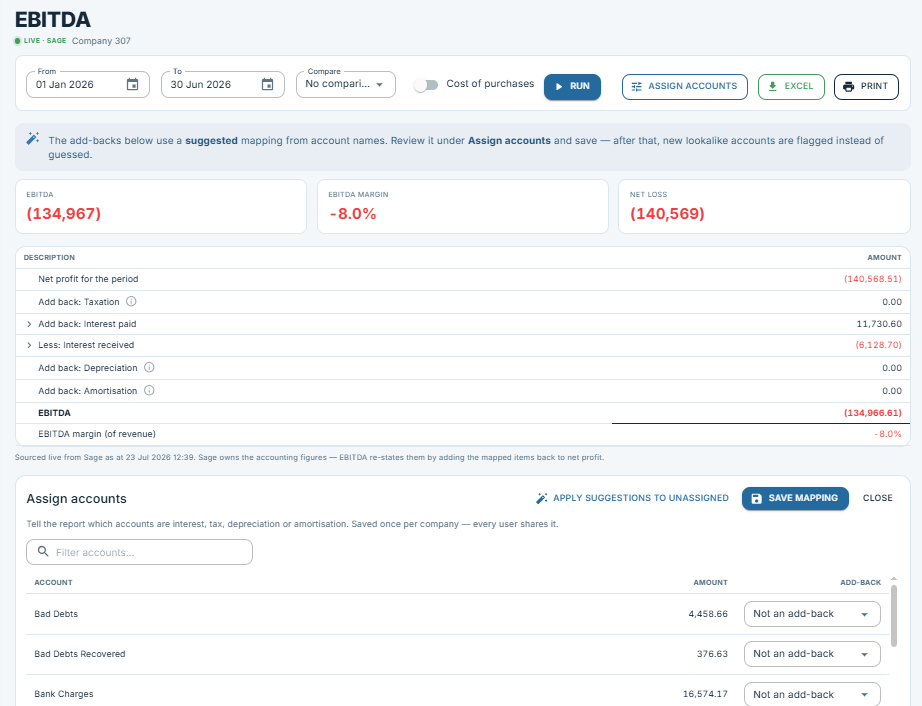
Apexar EBITDA — net profit re-stated with mapped add-backs, live from Sage
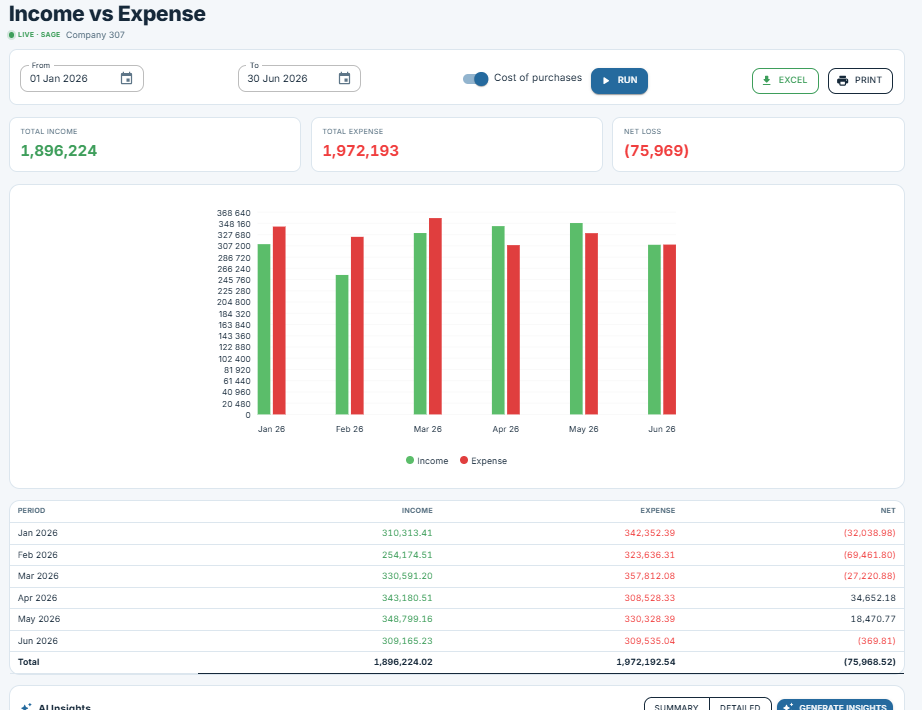
Apexar Income vs Expense — monthly income and expense with net result

Financials Hub

Your financial home at a glance — income, net result, cash on hand and outstanding debtors, with a 12-month trend and the biggest movers versus prior year.

Profit & Loss

The full income statement, pulled live from Sage so it always matches the books. Compare to budget, prior year or both; switch to monthly columns with YTD actual, YTD budget and prior YTD; filter to the Sage categories you care about.

EBITDA

Earnings before interest, tax, depreciation and amortisation — with drillable add-backs so every adjustment is traceable.

Balance Sheet

Assets, liabilities and equity at any date, with the key ratios that read the shape of the business.

Trial Balance

Every account's balance with built-in health checks that flag anomalies before they reach the statements.

Income vs Expense

Income and expense trended side by side to expose margin movement over time.

Cash Flow

Where cash came from and went — operating, investing and financing — across the period.

Aged Analysis

Debtors and creditors bucketed by age to surface collection and payment risk.

Cash Forecast

The next 13 weeks of bank balance, week by week, from the invoices and bills already in Sage — with what-if sliders for timing. The "can we pay the bills" view.

Forecast & Scenarios

A rolling 12-month P&L and cash forecast for the financial year, seeded from Sage and driven by growth, margin, inflation and payment-term levers. Overtype any cell, save Base, Upside and Downside side by side, and read off full-year profit vs budget and the lowest-cash month. The "will we make the year" view.

Health Check

An automated reasonableness sweep across the ledger that flags what looks off.

VAT Check

Reasonableness checks on VAT to catch mis-postings before submission.

Cash & Bank

Live balances across every bank account, as at now.

Top Analytics

The biggest movers, largest balances and standout accounts, ranked.

Report Builder

Compose custom financial reports from the same live Sage data.

Operational visibility 10 reports + unlimited pivots

From SBCA data

The movement the reporting category never touched — sales, orders, items and demand. And with Pivot Analysis you build and save as many custom layouts as you like, so the ten reports below are only the starting point.

Apexar Sales Dashboard — revenue, orders, items and rep performance
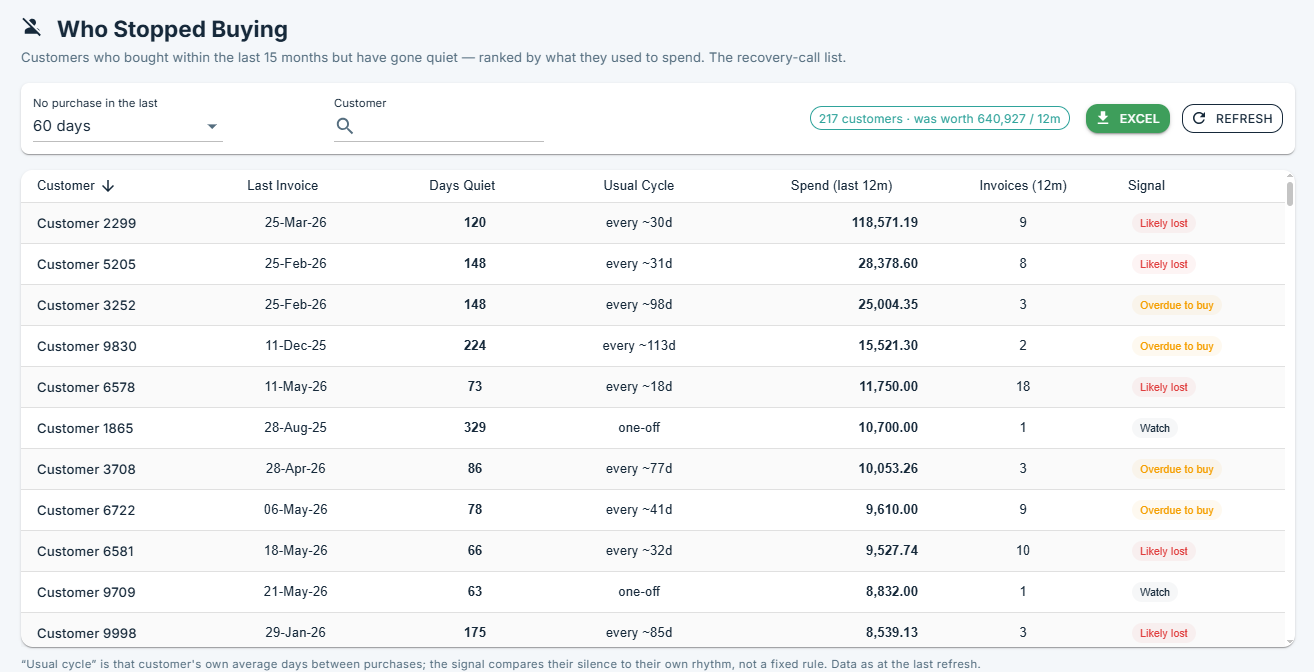
Apexar Who Stopped Buying — customer gaps ranked by spend

Sales Overview

Revenue, sales count, customers and average invoice, trended month by month with sales-rep contribution.

Sales Flash

A fast read on how sales are tracking right now against prior periods.

O/S Sales Orders

Outstanding sales orders line by line — ordered but part- or not-yet-fulfilled.

O/S Purchase Orders

Outstanding purchase orders line by line — on order but not yet received.

Item Demands

Item demand measured against stock on hand to expose shortfalls before they bite.

Item Forecast

Per-item statistical demand forecasting into suggested order quantities and weeks of cover.

Customer Gaps

Detects customers who've slowed or stopped buying — churn before it shows in the numbers.

Sales Reps

Rep-by-rep performance and contribution across the book.

Analysis Categories

Slice sales across customer, item and category dimensions.

Pivot Analysis

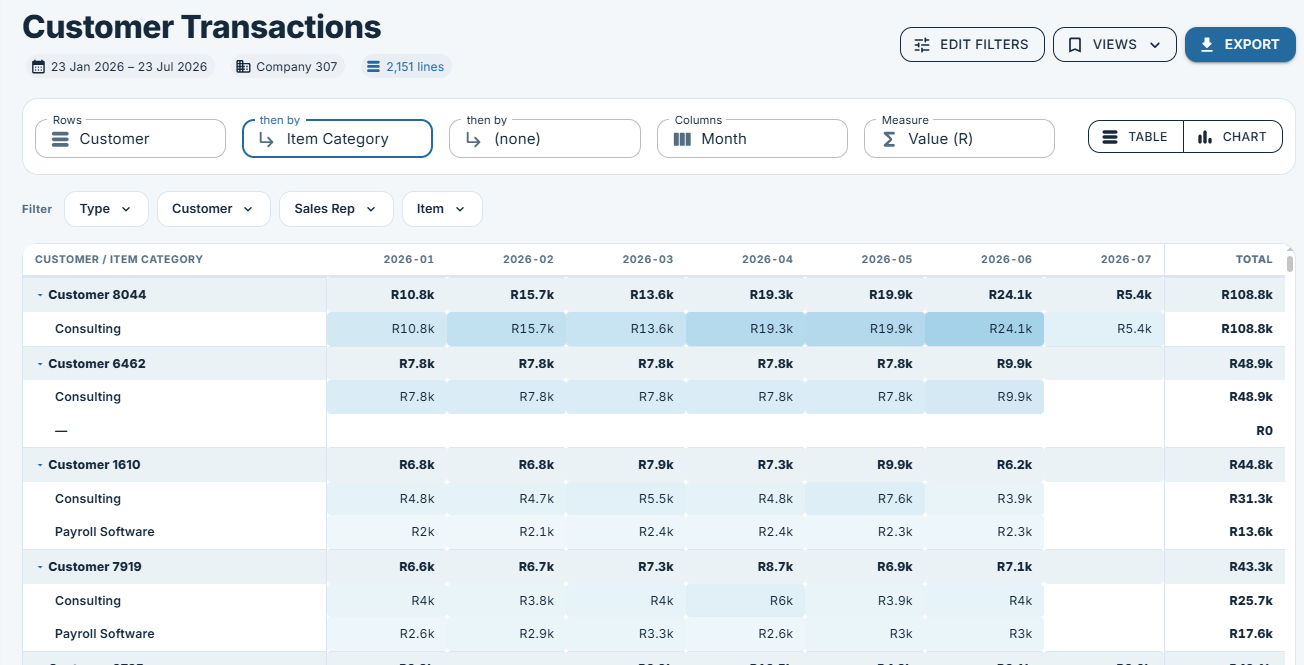
Native pivot tables with drill-through — build and save as many custom layouts as you need. One report, effectively unlimited operational views.

Asset management 4 reports

Live · via Sage API

The register Sage asked us to build — because their own doesn't produce the schedules practices need.

Assets Overview

A summary of the asset base, its value and the actions coming up.

Asset Register

The full fixed-asset register — cost, category, acquisition and current book value.

Wear & Tear

SARS-aligned wear-and-tear depreciation schedules, calculated automatically.

Movements & Actions

An action diary for services, licences and warranties — with inferred disposals surfaced.

AI

AI narrates · never calculates

AI commentary that narrates figures the application has already computed — it never touches the arithmetic. Ask in plain English, then verify against the full report underneath.

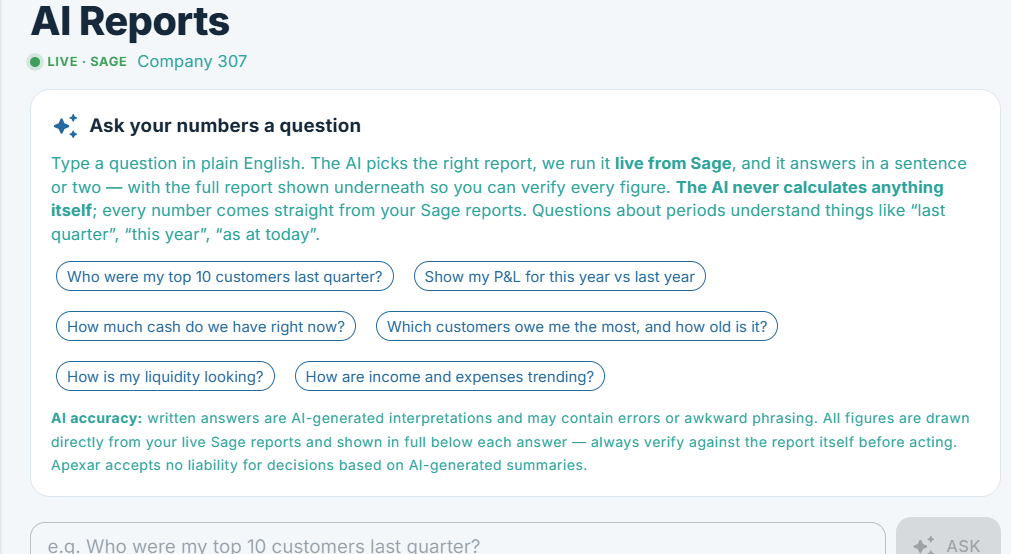
Apexar AI Reports — ask your numbers a question in plain English, answered live from Sage
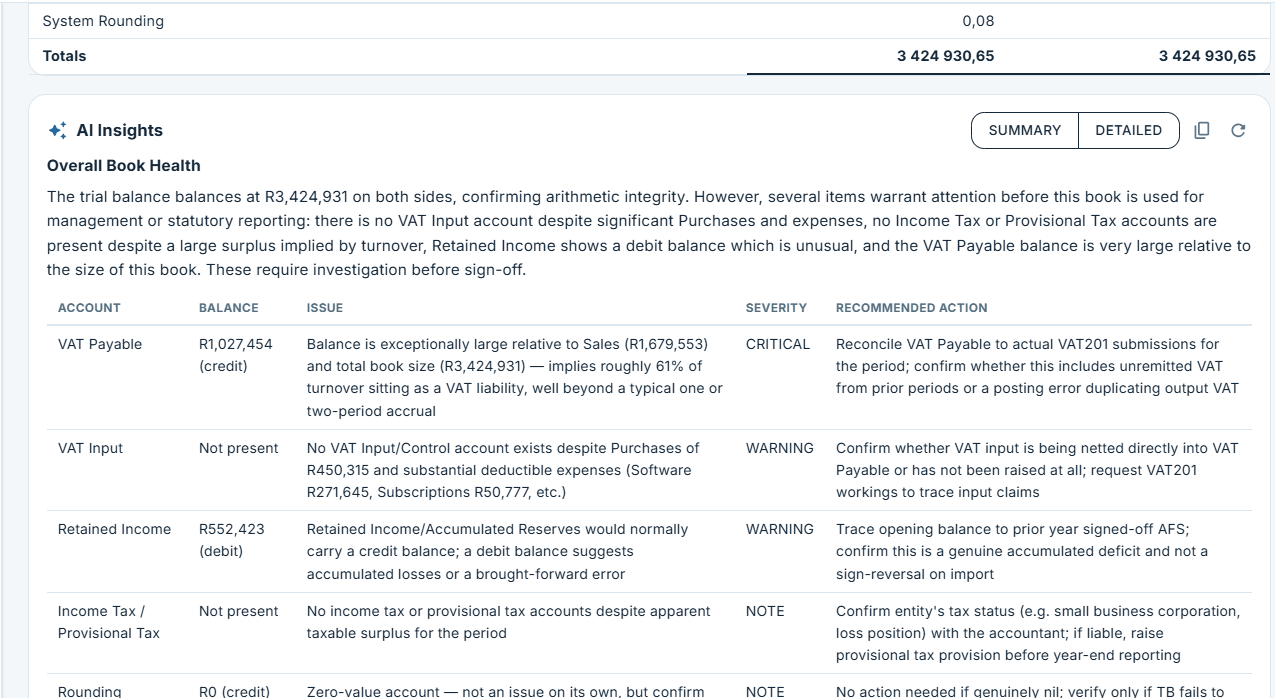
Apexar AI Insights — severity-flagged commentary with summary and detailed modes

AI Reports

Ask your numbers a question in plain English. Apexar picks the right report, runs it live from Sage, and answers in a sentence or two — the full report shown underneath so you can verify every figure. Every report also carries AI Insights: severity-flagged commentary (WARNING / NOTE), summary or detailed. Every number comes straight from Sage; the AI never calculates.

Ready to see your numbers clearly?